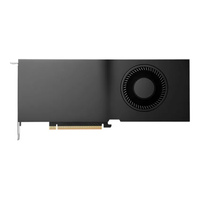
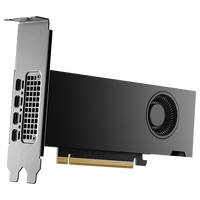
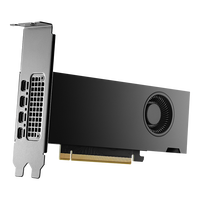
NVIDIA RTX Ada Lovelace Graphics Cards
NVIDIA RTX graphics cards based on the Ada generation were developed for professional workstations and demanding graphics, AI, and compute workloads. The Ada Lovelace architecture combines CUDA Cores with third-generation RT Cores and fourth-generation Tensor Cores. This makes the graphics cards suitable for CAD, 3D modelling, photorealistic rendering, video editing, simulations, and local AI applications.
Which NVIDIA RTX Ada Graphics Card Suits Your Applications?
| Model |
Suitable For |
Performance Class |
Recommendation |
| NVIDIA RTX 2000 Ada |
CAD, BIM, product design, and visualisation |
Entry-level to mid-range |
For compact workstations and professional applications with moderate requirements for 3D performance and graphics memory. |
| NVIDIA RTX 4000 SFF Ada |
3D CAD, visualisation, rendering, and AI |
Mid-range |
For small-form-factor workstations that require a compact graphics card with high compute performance and 20 GB of graphics memory. |
| NVIDIA RTX 4000 Ada |
3D design, rendering, content creation, and simulation |
Upper mid-range |
For professional workstations that require a powerful single-slot graphics card for more complex graphics and compute workflows. |
| NVIDIA RTX 4500 Ada |
GPU rendering, simulation, video editing, and generative AI |
High-end |
For demanding projects that require greater GPU performance and more graphics memory than the RTX 4000 Ada. |
| NVIDIA RTX 5000 Ada |
Complex 3D scenes, AI, digital twins, and GPU computing |
High-end |
For extensive professional workflows involving large datasets, high-resolution textures, or multiple applications running in parallel. |
| NVIDIA RTX 5880 Ada |
Rendering, scientific visualisation, AI, and large datasets |
Enterprise |
For memory-intensive workloads that require 48 GB of graphics memory but do not need the maximum compute performance of the RTX 6000 Ada. |
| NVIDIA RTX 6000 Ada |
High-end rendering, AI, simulation, and data visualisation |
Enterprise high-end |
For particularly compute- and memory-intensive workloads as well as large professional projects with the highest requirements for GPU performance and graphics memory. |
The RTX 2000 Ada and RTX 4000 SFF Ada are suitable for compact low-profile systems. If you need a powerful single-slot card, the RTX 4000 Ada is the more suitable choice. The RTX 4500 Ada and RTX 5000 Ada offer more compute performance and 24 GB or 32 GB of VRAM respectively. The RTX 5880 Ada and RTX 6000 Ada are designed for projects that require more than 32 GB of graphics memory.
Technical Specifications of NVIDIA RTX Ada Graphics Cards
| Model |
Graphics Memory |
Form Factor |
Max. Power Consumption |
Display Outputs |
| NVIDIA RTX 2000 Ada |
16 GB GDDR6 ECC |
Low profile, dual-slot |
70 W |
4x Mini DisplayPort 1.4a |
| NVIDIA RTX 4000 SFF Ada |
20 GB GDDR6 ECC |
Low profile, dual-slot |
70 W |
4x Mini DisplayPort 1.4a |
| NVIDIA RTX 4000 Ada |
20 GB GDDR6 ECC |
Full height, single-slot |
130 W |
4x DisplayPort 1.4a |
| NVIDIA RTX 4500 Ada |
24 GB GDDR6 ECC |
Full height, dual-slot |
210 W |
4x DisplayPort 1.4a |
| NVIDIA RTX 5000 Ada |
32 GB GDDR6 ECC |
Full height, dual-slot |
250 W |
4x DisplayPort 1.4a |
| NVIDIA RTX 5880 Ada |
48 GB GDDR6 ECC |
Full height, dual-slot |
285 W |
4x DisplayPort 1.4a |
| NVIDIA RTX 6000 Ada |
48 GB GDDR6 ECC |
Full height, dual-slot |
300 W |
4x DisplayPort 1.4a |
The GDDR6 memory used by RTX Ada graphics cards supports ECC, allowing memory errors to be detected and corrected. This is particularly relevant for long calculations, complex simulations, and business-critical workflows.
Typical Applications for NVIDIA RTX Ada Graphics Cards
CAD & Product Development
Professional RTX Ada graphics cards support demanding CAD and design software such as SOLIDWORKS, CATIA, Siemens NX, and AutoCAD. Certified NVIDIA RTX Enterprise drivers ensure stability and reliable visualisation of complex assemblies.
3D Design & Photorealistic Rendering
Whether you use Blender, Autodesk Maya, 3ds Max, or Cinema 4D, the Ada generation accelerates modelling, viewports, and GPU rendering. Third-generation RT Cores also enable hardware-accelerated ray tracing for realistic previews.
Architecture & Digital Twins
From BIM projects and architectural visualisation to digital twins, RTX Ada graphics cards enable smooth visualisation of large models and highly detailed scenes.
Video Editing & Media Production
The GPUs accelerate editing, effects, colour correction, and exports in applications such as Adobe Premiere Pro, DaVinci Resolve, and Adobe After Effects. The graphics cards also support hardware-accelerated AV1 encoding.
Simulation & Engineering
RTX Ada graphics cards are suitable for technical simulations, CAE, scientific visualisation, and the analysis of large datasets that require high GPU compute performance.
AI & GPU Acceleration
Fourth-generation Tensor Cores accelerate AI inference, machine learning, and GPU computing. Combined with CUDA, the GPUs are suitable for numerous professional AI, analysis, and development environments.
NVIDIA RTX Ada or RTX PRO Blackwell?
NVIDIA RTX Ada graphics cards cover a broad range of professional applications and offer up to 48 GB of ECC graphics memory, depending on the model. They remain a suitable choice for CAD, 3D design, rendering, visualisation, and GPU computing when the available performance and memory capacity meet the requirements of the respective workflow.
The newer NVIDIA RTX PRO Blackwell graphics cards offer a more recent architecture, fifth-generation Tensor Cores, and, depending on the model, more graphics memory. Large AI models, complex simulations, and particularly memory-intensive enterprise projects benefit most from these improvements. Whether Blackwell is worthwhile therefore depends not only on the age of the architecture, but also on the actual performance requirements, software support, and available budget.
Suitable Hardware for NVIDIA RTX Ada Workstation Graphics Cards
To allow NVIDIA RTX Ada graphics cards to deliver their full potential, the remaining hardware should also be matched to the intended application. Intel Xeon w7 and Intel Xeon w9 are particularly suitable for professional CAD, design, and content creation workflows. They offer high single-core and multi-core performance for demanding workstation applications.
Intel Xeon 6 or AMD EPYC processors are frequently used for GPU computing, virtualisation, AI development, and memory-intensive enterprise workloads. These platforms support large memory configurations and numerous PCIe lanes, making them ideal for systems with multiple professional graphics cards.
A powerful workstation is completed by ECC RDIMM memory, fast NVMe SSDs, a sufficiently powerful power supply, and efficient CPU cooling. The most suitable components depend on the selected graphics card, CPU platform, and the requirements of the software being used.
FAQ – NVIDIA RTX Ada Graphics Cards
Which Drivers Should I Use for NVIDIA RTX Ada Graphics Cards?
NVIDIA recommends RTX Enterprise drivers for professional applications. These drivers are tested and certified for numerous CAD, DCC, visualisation, and simulation applications to ensure high stability and compatibility in professional environments.
Are NVIDIA RTX Ada Graphics Cards Suitable for AI Applications?
Yes. Fourth-generation Tensor Cores accelerate AI inference and support numerous CUDA-based frameworks. This makes the graphics cards suitable for local AI applications, machine learning, image generation, and other GPU-accelerated workloads.
Why Is ECC Graphics Memory Important for Workstation Graphics Cards?
ECC can detect and correct memory errors. This improves reliability during long rendering jobs, simulations, scientific calculations, and other professional applications where data integrity is essential.
What Power Supply Do I Need for an NVIDIA RTX Ada Graphics Card?
The required power supply capacity depends on the specific model and the remaining system hardware. While the RTX 2000 Ada and RTX 4000 SFF Ada are particularly efficient with a power consumption of 70 watts, more powerful models require correspondingly greater power reserves. The specifications provided by the graphics card and system manufacturers are decisive.
What Cooling Do NVIDIA RTX Ada Graphics Cards Require?
The RTX Ada desktop graphics cards listed here use active cooling. The case should also provide sufficient airflow to dissipate the generated heat reliably. This is particularly important for systems operating under sustained high loads or using multiple graphics cards.
What Advantages Does the Ada Lovelace Architecture Offer over Older RTX Generations?
The Ada Lovelace generation offers third-generation RT Cores, fourth-generation Tensor Cores, and a modern AV1 encoder. This encoder can accelerate AV1 exports and compatible streaming or production workflows in hardware, provided the software supports AV1 encoding.