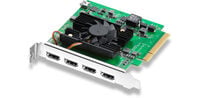
Capture cards enable the recording of video and audio signals from external sources such as gaming consoles, cameras, and gaming PCs. They are an essential tool for many streamers, allowing them to make their content more diverse and interesting.
There are two types of capture cards:
- external capture cards
- internal capture cards
Differences between internal and external capture cards
Internal capture cards are expansion cards for the PCI-Express slot and are installed in the PC. External capture cards, on the other hand, are usually connected via USB. This makes them suitable for use with laptops and all-in-one computers that do not have the option to install an internal capture card.
How do capture cards store video recordings?
The video material is usually stored on the hard drive of the connected PC or laptop. Some external capture cards also allow recordings to be stored directly on an SD card, so no separate computer is needed for recording. This is advantageous if the gaming console and PC are not in the same room or if the computer is not always accessible, for example, if it is shared.
We offer capture cards from these brands:
- AverMedia Capture Cards
- Elgato Capture Cards
- EVGA Capture Cards
- Magewell Capture Cards
These are the connectors offered by capture cards
The most common connectors for capture cards are HDMI ports. HDMI transmits both video and audio signals simultaneously. The capture card is placed between the HDMI output of the playback device, such as the console or the PC’s graphics card, and the display device, such as a TV or monitor. The signal is fed into the capture card via an HDMI input and output to the display or projector from the capture card via an HDMI output.
These different types of capture cards are available
For capture cards used solely for recording camera signals, output is unnecessary; therefore, devices like the Elgato Cam Link only offer an HDMI input and feed the signal directly into the recording device via USB. Larger models, however, offer multiple inputs and outputs, allowing a larger number of recordings to take place simultaneously. This is important if you want to record the actions of two or more players or the perspectives of different cameras in parallel.
HDMI Passthrough
HDMI passthrough determines the quality at which the signal is output to the gaming monitor or another display. Depending on the model, capture cards support different resolutions and frame rates as well as higher color depths needed for HDR content.